
Experts estimate that social media platforms could account for up to 60–80 % of all phishing attacks by the end of 2025, as hackers increasingly exploit the trust users place in these networks to steal credentials and personal data.
Global damages are projected to exceed $10.5 trillion annually by the end of 2025, with identity theft making up 18 % of all reported online fraud cases. On average, every social network user faces multiple hacking attempts each year, and nearly 1 in 5 social media accounts is targeted by hackers annually. With billions of users worldwide sharing photos, contacts, and other personal details, the risks are no longer hypothetical — they’re measurable and rising fast.
With these cunning fraudsters getting better every day, it is no longer an issue of whether social media is secure, but rather an issue of “How can you protect yourself on social networking sites?” Being not only fun and recreational but also defensive, it’s high time to ensure that your social media profile is protected and your personal details don’t go to those who shouldn’t be getting them.
In this article, we will explain to you the best possible ways to ensure your social media world remains safe and secure.
What Are the Risks of Social Networking Sites?
It is excellent to use social apps, but you must know what you’re up against in order to be one step ahead of the hackers. These dangers include the following:
- Identity Theft: Thieves steal your information to make accounts or commit crimes in the name of your clean reputation.
- Phishing Scams: You may receive what appears to be legitimate communications that are actually intended to deceive you into revealing passwords.
- Cyber Bullying: Harassment and negative commentary can weigh heavily on your mental health if left unattended.
- Data breaches: Sometimes, large sites suffer data breaches at the hands of hackers. Therefore, it is possible that you may end up having your email or phone number leaked.
- Links to Malware: You might actually end up getting a virus when you click a link to a viral video.
7 Best Practices for Safe Usage of a Social Networking Site
It does not have to be that hard to stay safe by incorporating those steps to lock down your online world. This is how you can protect yourself on social networking sites by using good safety practices.
1. Enhance Privacy Features
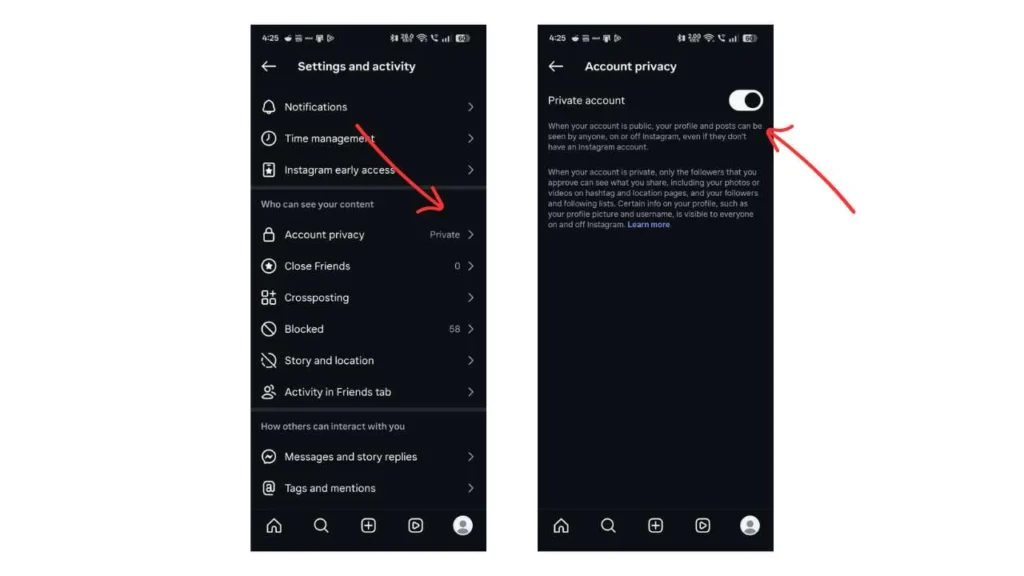
Your first step should always be to dig into your account settings to ensure that your own personal profile is not visible to the entire world. Many people share personal information through social networking sites, so reviewing privacy settings will give you an idea of which types of people can view, contact, or search for you. Taking the time to address privacy settings will put you in a safer online world.
- Privacy menu: Look at the privacy options on each of the social networks you are using, and be aware of what data can be seen by whom
- Profile access: Manage who can view your posts, stories, or personal info
- Search visibility: Turn off search engine indexing to prevent the profile from appearing in search results.
- Request control: Control the requests you receive for friends and/or direct messages
However, if these settings are applied well, your content remains restricted to the audience that you can trust.
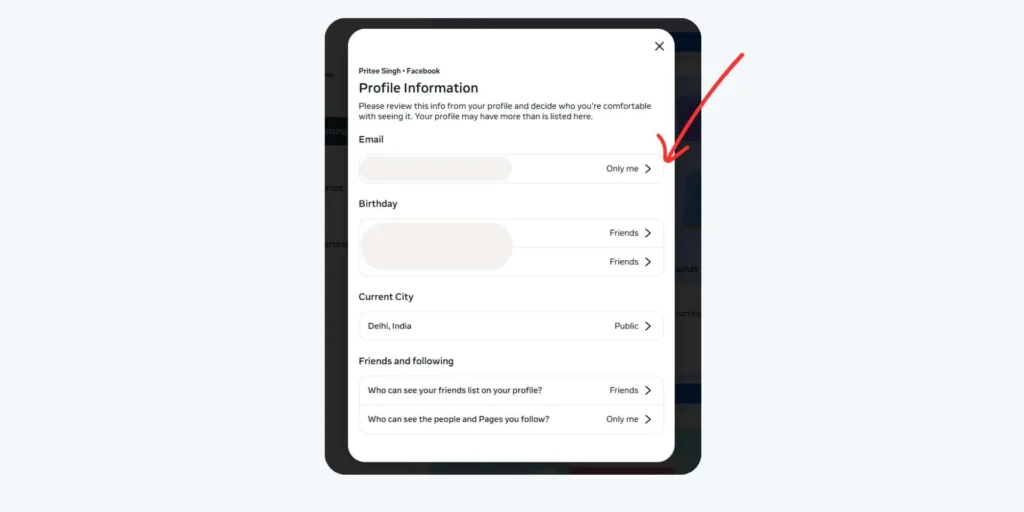
- Hidden details: Email and phone numbers should never be shared
- Birthday visibility: Limit or prevent viewing of your birthday
- Friend list: Control who can view your friends
- Location sharing: Disable the default location-sharing function between apps.
Such small changes are constructive in protecting your identity and preventing misuse of your data.
2. Employ Secure Passwords and Two-Factor Authentication (2FA)
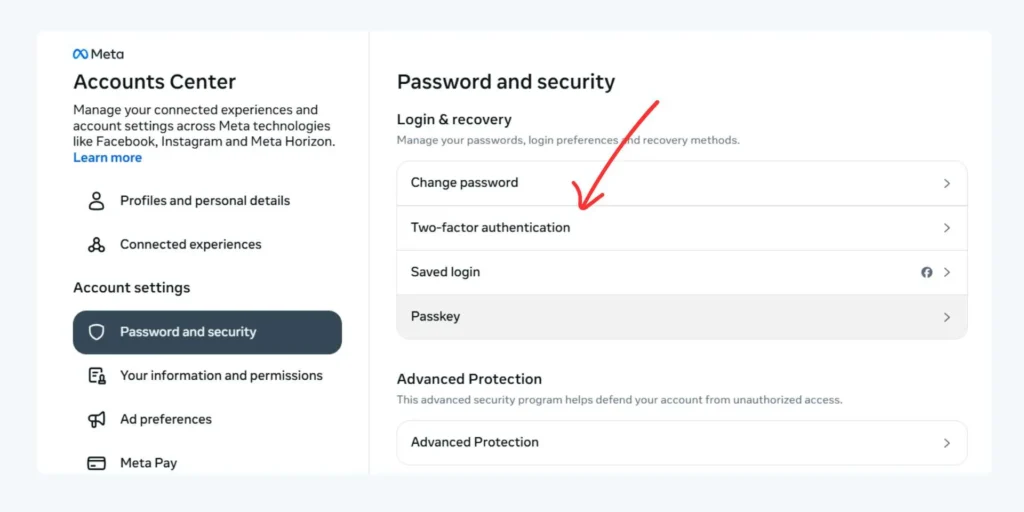
A weak password is like having your front door open, making it easy for hackers to walk right in. A strong password and two-factor authentication can provide a strong layer of security.
- Combining upper and lower case letters, numbers, and punctuation in passwords
- Don’t use names, dates of birth, or common words
- The password should be different for all social media sites
- Consider a trusted password manager
Good password practice will stop anyone else from getting access.
- Enable 2FA for all social media sites
- Use app-based authentication instead of SMS wherever possible
- Store backup codes safely
- Verify 2FA configurations periodically
Combining passwords and 2FA is an effective way against account takeovers.
3. Be Cautious with Links, Downloads, and Friend Requests
This is because social scams can appear to be safe due to their familiarity in terms of either known contact names or enticing offers. It is therefore prudent to remain vigilant before clicking any link or accepting any request.
- Suspicious links: Don’t click shortened or unknown URLs
- Unexpected files: Do not download files from unknown sources
- Urgent Tone: Messages that carry a sense of urgency or danger
- Fake Offers: Question any deals that appear unrealistic
A pause to check can save the day in serious security problems.
- Message verification: Verify questionable messages by reaching the sender through other means.
- Unknown profiles: Ignore or decline friend requests from strangers
- Fake accounts: Block and report suspicious or duplicate accounts
Being selective in interaction helps create a safer and more trusted social media environment.
4. Control Personal Information Sharing
While sharing personal news may flow naturally, oversharing can place you in the middle of identity theft and stalking on the Internet. Guarding yourself involves carefully considering what you are posting and where.
- Location posts: Do not post location information.
- Life updates: Share personal milestones only with trusted audiences
- Old posts: Look through previous postings for any sensitive data
- Public comments: Pay attention to details in public comments
This helps to ensure that the data available to fraud artists is limited.
- Geo-tagging: Turn off automatic photo geolocation tags.
- Passport/Citizenship IDs: Never share pictures of identification documents
- Travel details: Do not share boarding passes or tickets
- Work details: Keep professional and work details brief
Good sharing practices can ensure that your personal as well as professional life remains secure.
5. Monitoring Account Activity
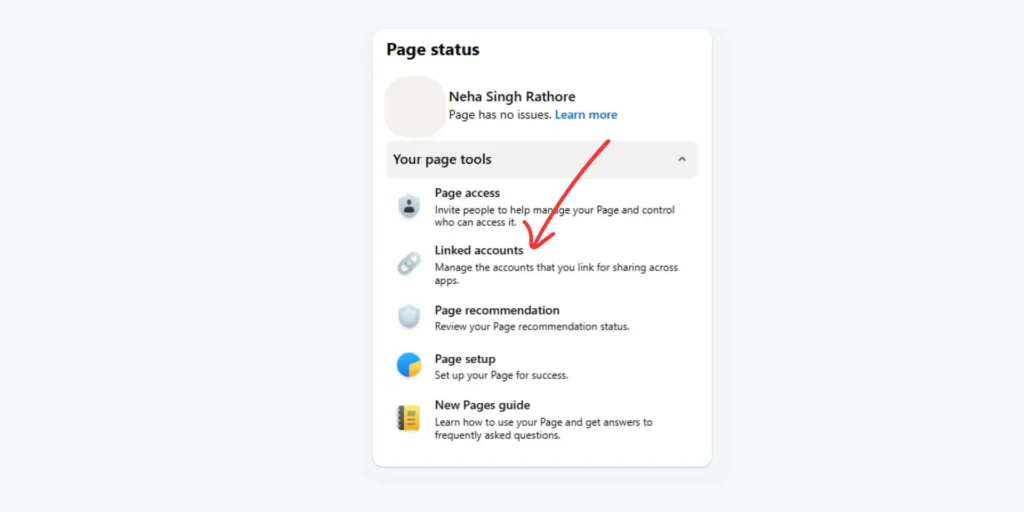
Account breaches may occur in the background, and this is where monitoring is crucial. Most social media services have features that can be used to check login activity, associated devices, and even current activity.
- Login history: Check for unfamiliar locations or devices
- Linked Apps: Check third-party app access to accounts
- Profile changes: Monitor for changes you did not make
- Security alerts: Listen to platform alerts
Early detection of unusual activity can prevent problems.
- Active Sessions: Log out of suspicious or unused devices
- Password reset: Immediately change passwords as needed
- Login alerts: Enable notifications for new logins
This helps it remain within your realm of control.
6. Educate yourself about Scams & Phishing
Cyber fraudsters keep on changing the way they work, which means one must remain informed when sharing their personal details on social networks. Knowledge of the scam process helps one detect the signs before the fraud takes place.
- Scam trends: This will ensure you are abreast of all the latest trends on social media scams and frauds.
- Patterns of phishing: Discover how phishing scams are constructed within emails, messages, and direct messages to appear as if they are from someone you know, but contain malicious activity
- Impersonation tactics: Learn about copying genuine profile pages, businesses, or friends for building trust and harvesting data
- Grammar clues: Look out for spelling errors, poor grammar, or unusual formatting that might indicate that the message is not genuine
- Urgent Pressure: Be wary of messages that use fear and urgency, such as threats and limited-time offers that attempt to prompt immediate actions
Staying updated can help avoid becoming a victim of online fraud.
7. Secure Your Devices & Networks
Your phone or laptop computer is what you use to connect to social networking sites; therefore, securing those devices is as important as securing the online accounts you open. Joining secure networks and keeping software up to date safeguards information from hackers.
- Lock screens: use strong PINs, password protection, and/or biometrics
- Public Wi-Fi Networks: Do not log on if you do not have to
- App sources: Download apps from official sources only
- Tracking Tools: Allow device tracking and remote wipe functionality
A secure device promotes safe social media usage.
- VPN use: Utilise a VPN when using public Wi-Fi
- Software updates: Update your operating system and applications
- Auto updates: Enable automatic security patches
- Security apps: Use reliable antivirus or security software
By protecting your devices and networks, you will greatly promote overall social media security.
Protecting Yourself Against Identity Theft
Identity theft is a nightmare that can destroy your credit and your reputation if you’re not careful with your online identities. Here is how you can protect yourself on social networking sites:
Why Social Networks are Targeted in Identity Theft
Social media sites are a goldmine for hackers because people tend to post snippets of information that can help answer security questions. Hackers harvest this information over time in order to create a whole picture of who you are.
- Public info: Scammers love it when profiles include full names, birthdays, and high schools since this info can be easily copied and spoofed.
- Trust factor: Clicking links and providing information is easier when messages seem to be from “friends.” Hacked accounts have great importance due to this factor.
- Oversharing behaviour: Posting too much information on a daily routine or travel plans provides scammers with information needed for security questions.
- Profiling Cloning: Hackers copy genuine profiles using pictures and public information to deceive friends into revealing confidential data.
- Lack of strong privacy settings: This creates easy targets for the gathering of information by criminals without arousing suspicion.
Steps to Prevent Identity Theft
Prevention is all about making yourself a difficult target so that hackers move on to someone else who is less protected. In addition to strong passwords, you should focus on the following:
- Minimal Data: Provide the minimum data possible to create an account for the social media site.
- Login security: Instead of relying on SMS, use an authenticator app for additional protection in your two-factor authentication.
- Login activity monitoring: Alert notifications can be set up to notify you every time an individual tries to log in to your account.
- App permissions: Check which third-party apps have access to your profile and remove any that you are not currently using.
- Privacy checks: Perform a “Privacy Checkup” on services such as Facebook and Google to find out what your profile looks like to the general public.
Recovery Process When Identity Theft Happens
But what if the worst-case scenario happens, and you come to understand that you have been a victim of identity theft? You must act quickly to prevent further harm.
- Change Passwords: It is essential that the password for your emails, as well as any other accounts that use the same login information, be changed immediately.
- Report it: There’s a tool on the site called “Hacked Account,” which will inform them that another person has access to your account.
- Notify banks: If you suspect your financial information has been compromised, contact your bank to freeze your cards and accounts.
- Inform friends: Update status (if you can) and ask friends to disregard any strange messages being sent using your name.
- Report incidents: Contact the FTC or your local police department if your legal identity or Social Security number has been affected.
Best Practices for Ongoing Safety
Safety is not something that you need to accomplish once; it is actually a lifestyle that will ensure that you remain safe online. These daily practices will ensure that you know how you can stay safe without any extra effort when using social networking websites:
- Audit accounts: Delete any accounts you had on old sites you no longer visit in years. These make for easy targeting.
- Be sceptical: Always have in mind that an arrangement that seems too good to be true may very well be either a scam or a trap.
- Safe Browsing: You can use a browser that alerts you before accessing a page known for phishing or malware.
- Privacy updates: After every big update, make sure you check your preferences because companies may alter what you have set as a default.
- Password manager: You can use a reputable software to save your varied passwords so that you do not remember them all.
Conclusion
While social networking sites are great ways to keep in contact, there’s a little bit of “digital street smarts” that must be used in order to keep you from being scammed. By securing privacy settings, protecting accounts with 2FA, and practising what you post, you can truly lower the risk of becoming a victim of a scam.
The secret to staying safe is consistency, which involves regularly auditing privacy settings and trusting your instincts when something doesn’t sound right. You now understand how you can protect yourself on social networking sites.
Also Read: Apps Like Snapchat
FAQs
1. Why do I need to secure my social media?
Securing your social media helps you safeguard your private life since hackers may use your identity to steal money from your friends.
2. Can I log in to other applications using my Facebook login details?
Though convenient, if you get hacked on Facebook, those applications are vulnerable as well. It is best to make a separate login for each web page or application.
3. How do you know when a friend’s page might actually be a scammer?
If your friend begins to ask for money or gift cards, or when they send you a link to the “Is this you?” video, their page may actually be hacked.
4. Does “Private” really protect me?
It definitely helps a lot, but it’s not foolproof by any means. Even if a friend of yours has had their account hacked, it can still leak your information.
5. Which is the most prevalent social media scam happening presently?
The most popular method for scammers to steal from you presently is through phishing links and “investment” or “job opportunity” scams.
6. Am I supposed to give my real last name when using my social media networking sites?
Yes, it is perfectly acceptable; just don’t use it in conjunction with your full address, telephone number, or birthdate.
