Building a strong backlink profile remains one of the most reliable ways to boost your website’s authority and rank higher on Google — and in 2026’s ever-evolving SEO landscape, that consistency matters more than ever.
Among all off-page strategies, profile creation sites stand out as one of the easiest, most beginner-friendly, and cost-effective ways to build high-quality backlinks — but only if done correctly.
Whether you’re a blogger aiming for your first 50 backlinks, a startup building online credibility, or an SEO professional scaling link-building efforts, using some reliable ping platforms, his guide has you covered.
Here, you’ll find 600+ free high DA PA profile creation sites for 2026, along with a step-by-step strategy, practical tips, and real insights into what actually works today — not outdated tactics.
What is Profile Creation in SEO?
Profile creation is a powerful off-page SEO technique that involves creating publicly visible profiles on authoritative platforms such as social networks, business directories, developer communities, and portfolio sites. These profiles allow you to include your website link in sections like bio, contact details, or website fields.
Each profile serves as a web citation, helping search engines like Google verify your brand’s authenticity, improve your online visibility, and strengthen your domain authority over time. These backlinks can be either dofollow (passing link equity) or nofollow (building trust and brand signals)—both play an important role in a balanced SEO strategy.
Most profile creation sites have high domain authority and allow users to showcase essential information such as name, business details, social links, and services. These platforms help businesses and individuals increase website traffic, enhance credibility, and build a strong online presence—often at no cost.
Why Profile Creation Still Matters in 2026 (Honest Answer)
Many SEOs question whether free Profile Creation Sites links are still relevant. An honest breakdown of this is:
- E-E-A-T is rewarded by Google: the presence of profiles on reputable services such as LinkedIn, GitHub, and Crunchbase is an indication that your brand is an actual, trustworthy, and mature one.
- Brand entity recognition: the presence of consistent profiles throughout the web contributes to the Knowledge Graph linking your brand name with your site, niche, and important topics to Google.
- Backlink diversity: an organic link profile consists of numerous types of links; profile links provide safe, low-risk diversity in addition to guest posts and niche edits..
- The presence of the nofollow links matters: Google confirmed that nofollow links are considered as hints and add to the overall trust and indexation indicators..
- Free of charge: the majority of the reputable websites are absolutely free to register and establish a profile..
- Quicker indexing: big sites such as Medium, About.me, and Behance are crawled more often, and this provides more gateways that Google bots can use to learn about and index your new pages..
- Referral traffic: websites such as GitHub, Behance, and Medium attract real human traffic and not bots..
- Local SEO increase: local directories and citation sites will get a business placed in local packs and Google Maps ranking.
Who Should Use Profile Creation Sites?
- New web site owners: who must gain first domain authority cheaply and easily.
- Bloggers and content creators: developing a personal brand on several platforms.
- Local businesses: which require regular NAP (Name, Address, Phone) mentioning with local SEO.
- Startups and SaaS companies: building credibility and online presence at the beginning.
- Freelancers and agencies: off-page optimization of clients who require white-hat, scalable link building.
- E-commerce stores: need to diversify their back link profile to include product links.
- Developers and designers: interested in displaying portfolios in niche-specific websites such as GitHub, Behance, and so on.
Benefits of Using Profile Creation Sites
Since profile building sites are available for free, you can enhance the effectiveness of digital marketing, increase presence, and enhance customer interaction with minimal costs.
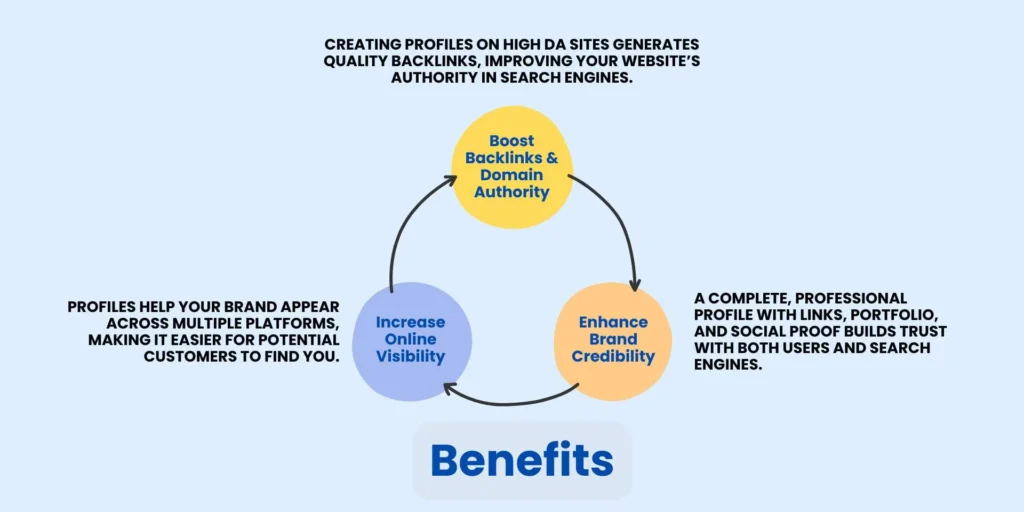
Improves Search Engine Rankings:
Most of these sites generate backlink from prominent sites with high DA and PA. These backlinks improve the SEO of your website through search engine rankings placing your website higher.
Enhances Online Visibility:
Having different accounts in various sites makes your brand or business popular in the internet search results. It increases your visibility and hence more chances of customers seeing and probably using your services or buying your products. By leveraging Digital PR, businesses can amplify their presence across multiple platforms through strategic mentions and coverage, further increasing visibility and attracting more potential customers. By analyzing your online presence in detail, seo audit services help uncover improvement opportunities, strengthen visibility across platforms, and drive more consistent organic growth.
Increases Website Traffic:
Again, when creating any profile, most of them allow you to enter your website URL. In turn, you drive traffic to your site, which means more inquiries, leads, and potential sales for your business.
Builds Credibility and Trust:
Having a profile in as many profile sites as possible helps give your brand a professional appeal and makes followers trust you.
Cost-Effective Marketing:
This means that a free profile creation site presents business opportunities to market your business at no additional cost hence is cheap.
Provides Networking Opportunities:
Certain sites act like professional networking platforms where you can find and connect with potential clients, and business partners for your business.
Helps in Reputation Management:
Through page and profile management, you are able to determine the type of image your brand will portray. Regularly frequently enhances your perception and makes sure that new data is not damaging to your brand image.
Lead Generation:
The use of relevant keywords in profile and well-developed content make the profile visited more often; thus, the visitors can be evolved into potential buyers.
Boosts Brand Awareness:
Being on the list of free profile creation sites for any brand takes it to other sites to reach a wider society, hence many people are likely to come across it.
Supports Local and Global Reach:
Thus, depending on a definite platform, it is possible to reach both local and global audiences, which is a powerful plus for business.
Paid vs. Free Profile Creation Services: To Invest or Not to Invest?
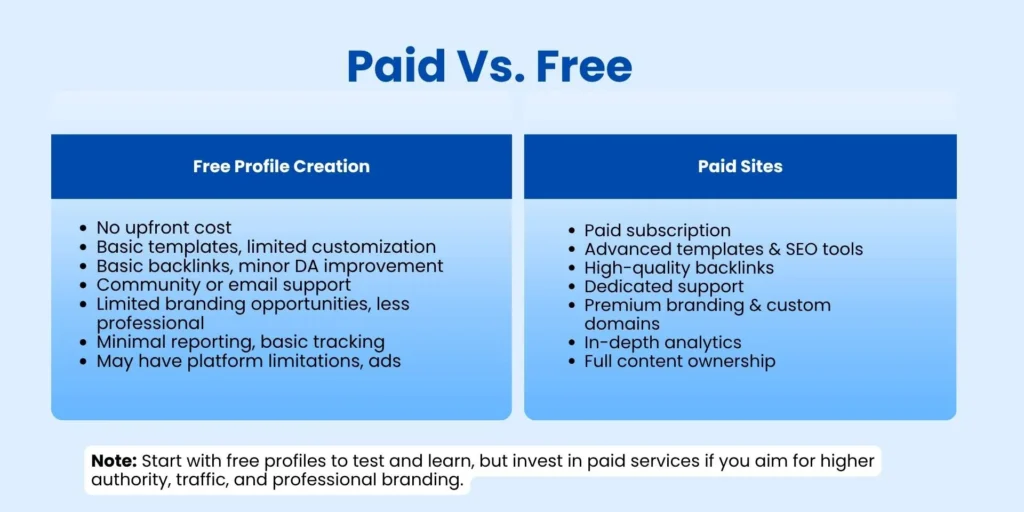
The first thing that you do when you begin to create profiles is whether to utilize free websites, buy premium listings, or employ a service. Here you can have a breakdown to make up your mind.
Free Profile Creation Sites
Such websites include Twitter, Medium, Behance, or Quora, where you can register and have a detailed profile without any charge.
Pros:
- Free: You may develop numerous backlinks and citations without any kind of budget.
- Authority: There are numerous free sites with very high Domain Authority (DA 90+), which can provide you with good backlink opportunities.
- Complete Control: You are the creator and the manager of the profile, and therefore, the information is correct and brand-appropriate.
- Best with Startups: Best with new companies, blogger,s and freelancers who have small marketing budgets.
Cons:
- Time-Consuming: Site location, registration, email validation and profile completion are time-consuming.
- Nofollow Often Nofollow: Nofollow links are provided only in the profile by many of the high-DA social sites.
- Weak Functionality: Free accounts can limit the places where you can post links or what functionality is available at paid levels.
Premium Listings (Paid Profile Creation).
They are commonly high-end business directories or industry-specific websites (such as Better Business Bureau, Angi, or premium Yelp listings) that require a charge to have a profile.
Pros:
- Increased Trust and Visibility: Paid listings are perceived to be more valid by the user and the search engines, and usually have dofollow links.
- More Features: You may add photos, videos, descriptions of the services in detail, and calls-to-action.
- Less Spam: A cost implies that these directories will be less spammy, and they will not include spammy and low-quality listings.
- Traffic Focus: Paid industry sites may offer extremely relevant referral traffic.
Cons:
- Cost: Prices vary between a modest annual payment and thousands of dollars, which is not affordable to everybody.
- ROI Immediate to Monitor: A sale or a lead to a particular paid directory can be hard to attach.
Ask Daman's Recommentdation
In the case of most businesses, a hybrid approach is the best:
- Begin with Free: Be sure to start with all the free profile sites, which are of the quality you need. That forms a decent foundation and incorporates large social media and high-DA general sites.
- Prioritize Local: When you have a local business, in the first instance, invest in the most critical local citation services or directories used by your customers.
- Invest Strategically: When you have established a free building base, go where competitors are listed. When they are in a particular paid listing of businesses, then it is a good indication that you should also join in the listing of companies.
- The bottom line: Don’t have a service provide generic profiles in free websites that you can create on your own. List in the budget on valuable, paid premium directories that your free competitors are not entitled to.
Interested in Building More Quality Backlinks:
Top 100 High DA PA Profile Creation Sites List (2026)
Suggested Reading: High DA Guest Posting Sites
Best Profile Creation Backlinks Websites (Tier Wise)
Profile Creation Sites with (DA 80 To 90)
Suggested Reading:
Zudio Franchise Cost In India
McDonalds Franchise Cost in India
Free Profile Creation Sites with DA 50+
Social Profile Creation Sites List
High DA Business Profile Creation Sites List
Free Portfolio Profile Creation Sites List
How to Find Best Sites to create a Profile on to get BackLinks
Competitive advantage can be achieved by finding new and niche-specific profile sites. Here’s how.
1. Use Google Search Operators
These are the narrowing down search commands.
- “keyword” + “create profile”
- “keyword” + “register”
- “keyword” + “sign up”
- “keyword” + inurl:profile
- “keyword” + inurl:user
- “keyword” + “my profile”
Example: If you are a photographer, type in photography + create profile or photographer + inurl:user.
2. Evaluate the Backlinks of Your Competitors.
This is the best way. Apply such tools as Ahrefs, Semrush or Moz.
- Add a competitor to the tool Site Explorer or Backlink Analytics.
- Search backlink report with profile page links.
- Find locations where some of your competitors are listed; they tend to be highly valuable and interesting to your industry.
- Export the listnow you have a pre-prepared, very relevant list of sites to attack.
3. Find Niche and Industry Lists.
Use the terms unique to your area of interest, not the general profile creation websites.
- industry + directories (e.g. SaaS directories)
- industry + forums (forums tend to have profile pages)
- “industry” + “community”
- “industry” + “submit website”
4. Check for Community or Portfolio Sections
A lot of sites allow user profiles, particularly technical and artistic sites.
- Design: Behance, Dribbble, Carbonmade.
- Developers GitHub, Stack Overflow, GitLab.
- Scholars: Researchgate, Academia.edu.
- Marketing: GrowthHackers communities, Inbound.org.
What Makes a "BEST" Site?
- High DA/DR: A Domain Authority or a Domain Rating of 50 and above is good, and above 70 is excellent.
- Relevance: A full relevance of a site with DA 40 linking in your niche is superior to a high DA 90 linkage that is irrelevant.
- Indexable Profiles: Make sure that your profile pages are open and accessible to Google (no noindex tag and do not require a login before access).
- Complete: The ideal sites will allow you to provide a bio, a profile picture, and a link to a website.
How to Check DA & PA of Profile Sites
- Moz Link Explorer (moz.com/link-explorer): the first tool of the DA/PA; it works as a free version; drop in any URL to receive metrics.
- Ahrefs Website Authority Checker: visit the free DR (Domain Rating) checker of Ahrefs at ahrefs.com/website-authority-checker.
- Semrush Domain Overview: verify Authority Score, organic traffic and spam signals at the same time.
- MozBar Chrome Extension: this is a free extension that you can add to your browser to display the DA/PA of any webpage you access in your browser toolbar.
- SEOquake Chrome Extension: displays domain data, indexed pages, and Alexa rank in real time.
- Check Spam Score: apply Moz spam score indicator; do not use sites that score more than 5-7%.
How to Create Profile Backlinks (Step-by-Step)
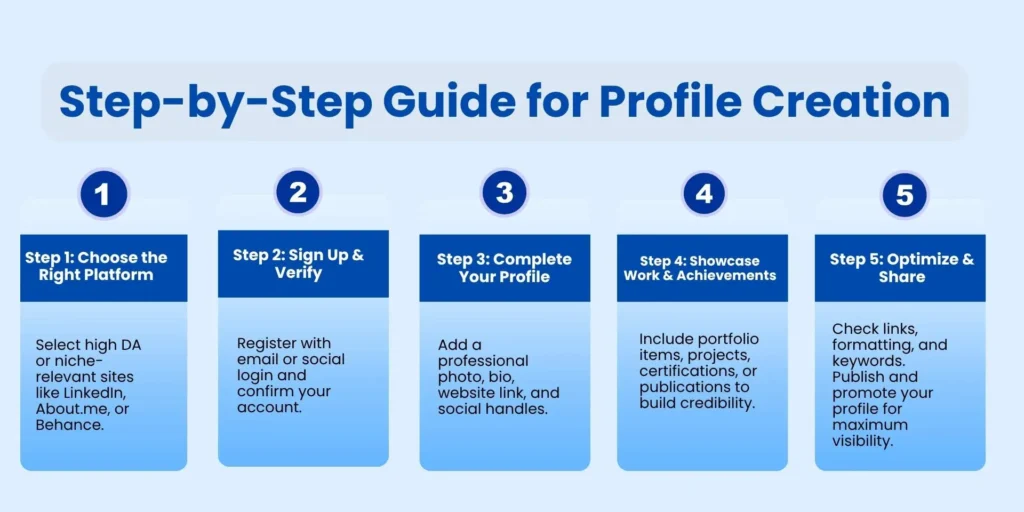
Step 1: Ready Your Brand Assets
Organize yourself before accessing one site. Prepare all that you would need in a single location to make it quick and steady.
- Write a 2–3 variations of your bio (short: 40 words, medium: 80 words, long: 150 words)
- Make a good profile picture (400×400 minimum) and logo.
- Be prepared with your web address, social media platforms, email and phone in a document.
- Choose a uniform username to be used on all the platforms (preferably your brand name).
Step 2: Search for High DA Sites
The best approach to it is to make a search for a profile creation sites list. It should therefore be noted that it is more advantageous that one focuses on platforms with high domain authority (DA) and page authority (PA).
- High DA 50+ target sites to get maximum link equity.
- Sort by niche relevance – developer? Prioritize GitHub. Designer? Prioritize Behance
- Do not go to sites that are above 5% Moz Spam Score.
- Test dofollow or nofollow (such as Ahrefs or SEOquake)
- Instead of submitting to 500 or more low quality sites, start with 50-100 good sites.
Step 3: Register or Sign Up
Go to the selected website and click on the Sign up button where you put your email address, username and password. Some sites also give the opportunity to sign up with social networks or Google accounts for instance.
- Email your business address (not a random Gmail)
- Full email verification is required immediately, otherwise unverified accounts can be deleted.
- Turn on 2 factor authentication of high-priority platforms to secure your profiles.
- Make the password manager remember login credentials in case of updates.
Step 4: Verify Your Account
After registration, you will receive a confirmation letter to the indicated email address. Use the link to activate your account and finalise the registration process.
Step 5: Fill in Basic Information
Include your name or your business name, your phone number and/or e-mail address, the URL of your website and a brief description of what you do.
Step 6: Add a Profile Picture or Logo
Choose an appropriate image or logo to display on your profile such that your profile has a good first impression.
Step 7: Write an Optimized Description
Write a brief, keyword-inclusive description. However, it is recommended to use the following keywords for better search engine optimization, including, profile creation site, free profile creation site, and profile creation site for backlink.
Step 7: Add and Verify Your Website URL & Social Links
All the active social media accounts should have links added to the site for improved functionality and better representation of trust.
- Find the field of the site or URL (it may be in profile settings [as on sometimes in the section called Contact or About])
- Type in your complete URL using HTTPS (e.g., https://yoursite.com)
- Other services (such as Google Business Profile) demand the verification of the URLs.
- Ensure the connection is publicly visible and clicks on the live profile page.
Step 8: Save and Publish
After going through all the information ensure that it is correct then click on save and publish profile.
Step 9: Monitor and Update Regularly
It is recommended to come back to your profiles every once in a while and update the information on your profiles. This will make sure that there is a constant SEO advantage as well as business operation online is consistent.
Pro Tips for Effective Profile Creation
Following these steps will get you well-crafted user-friendly profiles that will also be well indexed by the search engines and thus improve visibility, and interaction online.
Use Accurate and Consistent Information:
When creating profiles make sure that the name and details of your business, phone numbers, website address are consistent. Consistency brings credibility and enhances the search engine ranking.
Optimize with Relevant Keywords:
Use other keywords such as ‘profile creation websites’ and ‘free profile creation sites’ in your descriptions and titles to increase the search engine visibility of profile creation and thus bring in more visitors.
Include Professional Images:
A clear, professional profile picture or the company’s logo creates an appealing appearance to the account. Graphics make your profile more easily recognizable and credible.
Provide a Clear and Compelling Description:
Write in an enthusiastic voice when presenting what services you provide or what you are good at. Make sure your advertising message gives the reader a clear understanding of what makes you different and why you should be heard amongst the noise.
Add Social Media Links:
Linked to your currently active social media accounts. This enhances the traffic to your main website and social media platforms which is an important factor for online success.
Regularly Update Your Information:
Old Profiles can really bring a lot of harm to the reputation of a person or company. An important one is best to revisit and renew your specifics often in order to be current and authentic.
Common Mistakes to Avoid
- With automated tools: platform algorithms identify and remove software-generated profiles; never use automated tools to create profiles; only human-generated profiles are safe and will not be banned.
- Pasting the same bio everywhere: it is a spam warning sign when the same content is copied and pasted on 100 profiles; write slightly different bios and profile descriptions on different sites.
- The development of profiles in spammy websites: developing your profiles in low quality directories full of casino or adult links may in fact negatively affect the spam rating of your site; always check sites beforehand.
- Neglecting profile upkeep: dead profile links and forsaken URLs (when a domain changes name or brand) are poisonous; review your profiles at least once a year.
- Quantity over quality attitude: 500 blank profiles on mediocre websites is much less effective than 50 complete profiles on high-authority websites; it is about quality, not quantity.
Not verifying email: most websites delete unverified accounts in 30 days, erasing all your efforts; always be sure to verify email accounts as soon as they are created.
Monitoring & Tracking Profile Creation Backlinks
It is not half the battle to create profiles. You ought to observe them such that your links remain working and how they assist.
1. The Easy Way: Google Sheets.
Record your actions in a spreadsheet since the very beginning.
- Column A: Site Name (e.g., Twitter)
- column B: Profile URL (the address of your new profile)
- Column C: Website Link (the link you added on the profile)
- Column D: Username
- Column E: Email Used
- Column F:Status (e.g. Live, pending, email not verified)
- Column G: Type of Link (Dofollow/Nofollow)
2. Check for Indexing
Google has to be aware of your connection.
- Manual Check: Take a copy of your profile URL and enter it into Google with the help of the site: operator.
- Where your-username is your account name on behance.net.
- If it appears: It’s indexed.
- Otherwise: It is not indexed. The URL can be pinged or reported to the Search Console of Google to ask it to be indexed, although in most cases, it will frequently index without any help.
3. Employ Backlink Monitors.
This is facilitated by professional SEO tools.
- Ahrefs: Select the Backlinks report. It will reveal new and forgotten connections. Click on New to check which of your new profiles have been located.
- Semrush: The tool of Backlink Audit is ideal. Register your list of profile links and Semrush will verify it to check whether it is alive and has not been converted into Nofollow.
- Moz Pro: The feature of the “Link Explorer” displays links that are found with time.
4. Monitor for “Lost” Links
The links may be lost when websites are updated, or the profiles become inactive.
- The tool (Ahrefs, Semrush) will include a report on Lost Links.
- Check this report monthly. In case you notice that you have lost a valuable profile link, you can go to the site.
- You might have to log in once more, remake the check on your email, or revise your profile to obtain the link once more.
5. Track Referral Traffic
Check whether these profiles attract you actual visitors.
- Go to Google Analytics.
- Select Acquisition Traffic Acquisition.
- See the report on the source of the session or the session source / medium report.
- You will also get traffic on such sites as t.co (Twitter), linkedin.com, quora.com, etc. This demonstrates that the profiles are not only good in terms of SEO but also active marketing channels.
Alternatives to Profile Backlinks
Final Words
In 2026, profile creation sites are one of the surest, user-friendly, and white-hat off-page SEO techniques. When done correctly, including full profiles, custom bios, quality platforms, and consistent NAP information provide actual advantages: better domain authority, quicker indexing, better E-E-A-T indicators, and a more natural backlink profile.
This guide is a great place to begin with the 600+ sites listed there, however, it should be kept in mind that quality is always better than quantity. Build 50 outstanding profiles rather than 500 half-empty ones. This, coupled with excellent content, smart technical search engine optimization, and focused linkage building makes profile creation a silent but highly effective component of your long-term SEO achievement.
FAQs
A free profile creation websites list consists of About.me, Crunchbase, and AngelList.
Backlinks are one of the most important factors, and profile creation sites give good quality backlinks from sites with high DA.
Not really but there are many profile creation sites which are free and they possess very good tools to create excellent online profiles.
These are places where there is a strong domain and page ranking which when used for backlinks helps improve your ranking.
There is an option to search for the lists of profile creation sites with the DA and PA scores in order to make the most of the SEO.
Yes – when they are appropriately done on high-DA platforms, they enhance brand authority, backlink diversity, and E-E-A-T signals, all of which will be still significant ranking factors in 2026.